




服务热线
15527777548/18696195380
发布时间:2018-05-30
简要描述:
本文原创作者:3s_NwGeek原创投稿详情:重金悬赏 | 合天原创投稿等你来!0x01 应用背景无论是安全服务的苦逼还批量挖洞的渗透伙伴时不时会使用到wvs批量扫描,而且结果要逐个打开wv...
本文原创作者:3s_NwGeek
原创投稿详情:重金悬赏 | 合天原创投稿等你来!
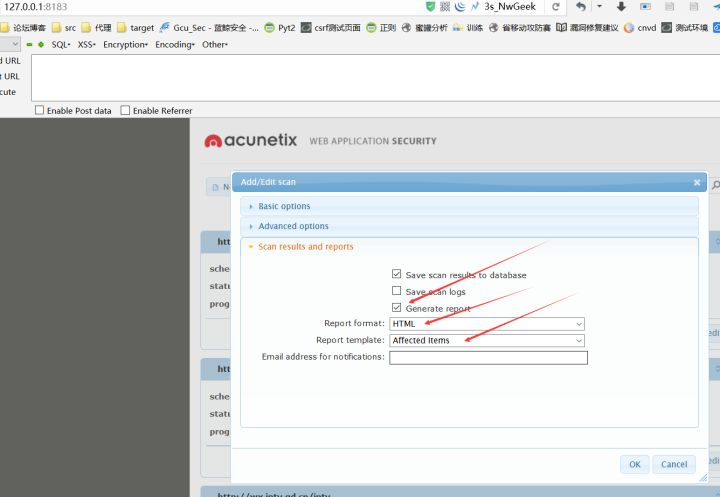
无论是安全服务的苦逼还批量挖洞的渗透伙伴时不时会使用到wvs批量扫描,而且结果要逐个打开wvs报告,然后把漏洞整理漏洞等级、名称、描述、修复建议到excel里。历经40小时开发和调整,现在实现了自动化完成而且免python环境执行,批量输出 漏洞等级,漏洞名称,漏洞url,扫描资产的url,还自动翻译漏洞名称、漏洞描述和修复建议英文,大大改善重复体力工作。
wvs批量提取扫描结果工具使用说明书。已升级到3.0版本,比较完善,可以提取 漏洞等级,漏洞名称,漏洞url,扫描地址,漏洞参考数据包,漏洞描述,漏洞修复建议,使用百度翻译api,自动翻译,联网即可使用。
5. 打开cmd,把wvsReprot3.0.exe拖进cmd (需要联网环境)
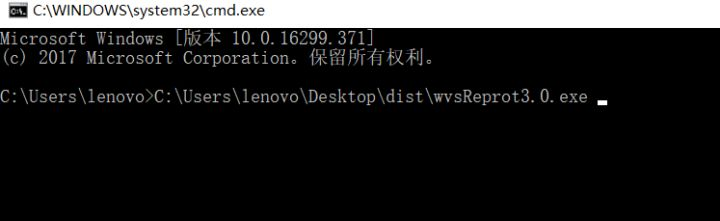
6. 然后再加保存wvs扫描结果的文件夹的路径
7. (默认是这个: C:\Users\Public\Documents\Acunetix WVS 10\Saves)
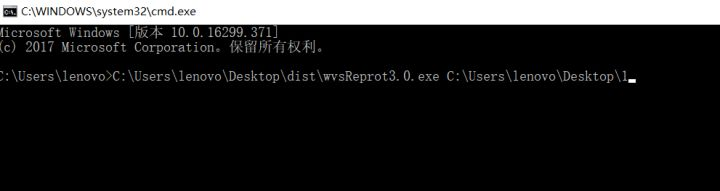
8. 回车执行即可输出报告
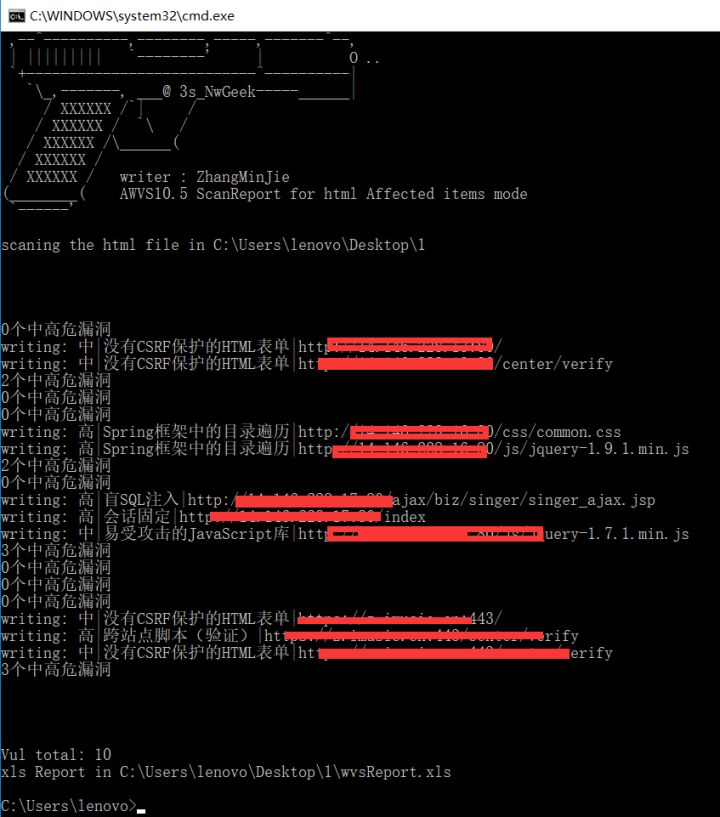
9. 输出结果示例如下:
漏洞等级 | 漏洞名称 | 漏洞url | 扫描资产 | 参考数据包 | 漏洞描述 | 修复建议
按照是wvs报告使用百度翻译api输出。
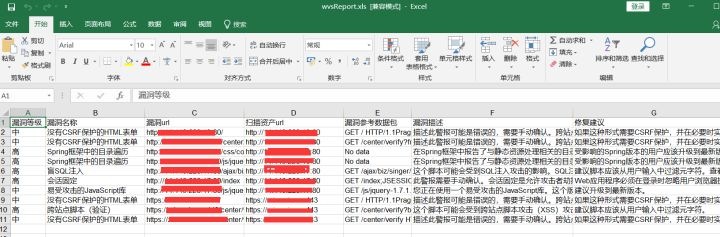
工具在文末发放!
1. python爬虫
2. python excel处理模块
3. 百度翻译api
4. python 2 exe 打包编译
1.首先来看一下wvs报告的html格式
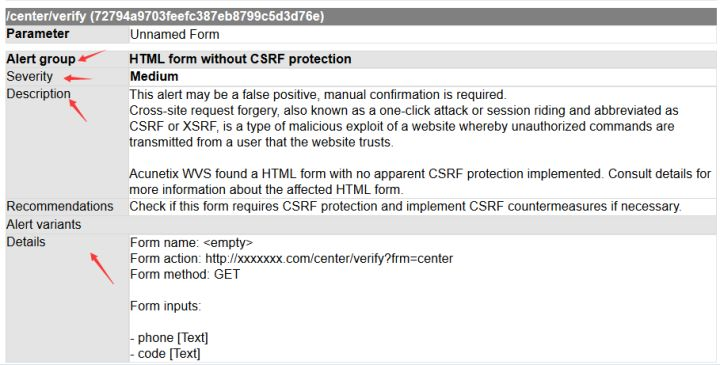
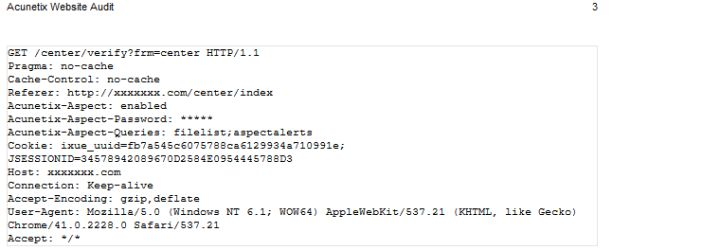
每个扫描到的漏洞的信息都会有标签顺序
漏洞url
Alert group 漏洞名称
漏洞等级
漏洞描述
漏洞参考数据包
漏洞修复建议
所以大概实现的原理只需定位一个Alert group,然后再上下按顺序找每个特定的标签即可。
Python爬虫只爬取中高危漏洞
用到模块
import os,sys,re      #文件i/o
from bs4 import BeautifulSoup #标签爬取
import httplib,md5,urllib,random,time#baidu 翻译
import xlwt#excel写入
关键代码如下
sites = soup.find_all(class_=re.compile('^s'),text="Alert group")
#获取host
tem=str(soup.find_all(class_=re.compile('^s'),text=re.compile('^Scan of'))[0].string).split("/")
host=(tem[0].replace("Scan of ","")+"//"+tem[2])
scanurl = str(soup.find_all(class_=re.compile('^s'), text=re.compile('^Scan of'))[0].string).replace("Scan of ","")#扫描的资产url,跟漏洞url会不一样
===================================================================
#定义标准attrs爬取
#漏洞名称attrs爬取
vulname_attrs = sites[0].find_next(class_=re.compile('^s')).attrs
#漏洞等级attrs爬取
vullevel_attrs=sites[0].find_next(class_=re.compile('^s')).find_next(class_=re.compile('^s')).find_next(class_=re.compile('^s')).attrs
#漏洞url attrs爬取
vulurl_attrs=sites[0].find_previous(class_=re.compile('^s')).attrs
test=sites[0].find_previous(class_=re.compile('^s'))
if "Parameter" in test.find_previous(class_=re.compile('^s')).string :
    vulurl_attrs = test.find_previous(class_=re.compile('^s')).find_previous(class_=re.compile('^s')).attrs
##############################
#漏洞描述爬取
vuldes = site.find_next(class_=re.compile('^s'), text="Description").find_next()
vuldes = ''.join(vuldes.parent.stripped_strings)
vuldes = str(vuldes).decode("unicode_escape")
vuldes = translate(vuldes)#百度翻译
time.sleep(1)               #百度翻译api只允许1秒1次
# print vuldes
##############################
# 修复建议爬取
vulre = site.find_next(class_=re.compile('^s'), text="Recommendations").find_next()
vulre = ''.join(vulre.parent.stripped_strings)
vulre = str(vulre).decode("unicode_escape")
vulre = translate(vulre)#百度翻译
time.sleep(1)               #百度翻译api只允许1秒1次

###############################
#获取数据包
try:
    requestattrs = vulname.parent  # 漏洞名tag
 request = site.find_previous(attrs=vulurl_attrs).string  # 路径
    #上面已定义sep = re.compile(r'\s*\((.*?)\).*?' )           #同一个漏洞不同参数会出现路径后有(md5)导致出错,正则去除
 request = sep.sub('',request)
    rex = "^(GET|POST|OPTION|DELETE).+" + request + ".+"  # 正则
 if request == "Web Server" and request =="/" :
        req = "Web Server"
    else:
        req = requestattrs.find_next(text=re.compile(rex))
        req=''.join(req.parent.stripped_strings)  # 数据包tag
 req = str(req).decode("unicode_escape")
except Exception as des:
    req="No data"
2. python excel处理模块
file = xlwt.Workbook(encoding = 'utf-8')  # 注意这里的Workbook首字母是大写,
table = file.add_sheet('wvs')
table.col(1).width=320*20
table.col(2).width=320*20
table.col(3).width=320*20
table.col(4).width=220*20
table.col(5).width=520*20
table.col(6).width=520*20
table.write(k, 0, u"漏洞等级") #写入第一行
table.write(k, 1, u"漏洞名称")
table.write(k, 2, u"漏洞url")
table.write(k, 3, u"扫描资产url")
table.write(k, 4, u"漏洞参考数据包")
table.write(k, 5, u"漏洞描述")
table.write(k, 6, u"修复建议")
table.write(k, 7, u"漏洞验证")
table.write(k, 8, u"备注")
table.write(k, 0, vullevel) #写入爬取的标签
table.write(k, 1, vulname)
table.write(k, 2, vulurl)
table.write(k, 3, scanurl)
table.write(k, 4, req)
table.write(k, 5, vuldes)
table.write(k, 6, vulre)
genpath="%s\\wvsReport.xls" %sys.argv[1]       # 保存文件
file.save(genpath)
print "\n\n\n\nVul total:", k
print "xls Report in %s\\wvsReport.xls" %sys.argv[1]
3. 百度翻译api
比较好理解:输入英文输出中文
def translate(WORD):
    appid = '20151113000005349'
 secretKey = 'osubCEzlGjzvw8qdQc41'
 httpClient = None
    myurl = '/api/trans/vip/translate'
 q = WORD
    fromLang = 'en'
 toLang = 'zh'
 salt = random.randint(32768, 65536)
    sign = appid+q+str(salt)+secretKey
    m1 = md5.new()
    m1.update(sign)
    sign = m1.hexdigest()
    myurl = myurl+'?appid='+appid+'&q='+urllib.quote(q)+'&from='+fromLang+'&to='+toLang+'&salt='+str(salt)+'&sign='+sign
 try:
        httpClient = httplib.HTTPConnection('api.fanyi.baidu.com')
        httpClient.request('GET', myurl)
        response = httpClient.getresponse()
        trword=response.read().split("\"")[-2].decode('unicode_escape')
 except Exception, e:
 print e
 finally:
 if httpClient:
            httpClient.close()
 return trword
4. python 2 exe 打包编译
使用py2exe
from distutils.core import setup
import py2exe
# cli # python C:\Users\lenovo\PycharmProjects\untitled\test100\打包.py py2exe

def main():
    setup(console=["C:\Users\lenovo\PycharmProjects\untitled\\3s_NwGeek\work\\wvsReport.py"])
if __name__ == '__main__' :
    main()
 pass
编译打包后就可以不需要python环境运行。
工具分享链接
链接:https://pan.baidu.com/s/1a3crdN-UFf-1WBeUa5SWcg
密码:mo32
注:本文属合天原创奖励文章,未经允许,禁止转载!
如果您有任何问题,请跟我们联系!
联系我们
Copyright © 武汉网盾科技有限公司 版权所有 备案号:鄂ICP备2023003462号-5
地址:联系地址:湖北省武汉市东湖新技术开发区武大科技园兴业楼北楼1单元2层